

Appearance
Visual Studio 代码
🌐 Visual Studio Code
Visual Studio Code(VS Code)是一款流行的代码编辑器,提供了广泛的功能和扩展,以增强你的开发体验。
🌐 Visual Studio Code (VS Code) is a popular code editor that provides a wide range of features and extensions to enhance your development experience.
关闭 IDE 中的自动补齐功能
🌐 Turn off autocomplete in your IDE
所有图标都从主模块导出。这可能会在你的 IDE 的自动补齐建议中产生大量噪音。你可以通过在 VS Code 设置中添加以下设置来关闭它。
🌐 All icons are exported from the main module. This can create a lot of noise in the autocomplete suggestions of your IDE. You can turn this off by adding the following setting to your VS Code settings.
json
{
  "js/ts.preferences.autoImportFileExcludePatterns": [
    "lucide-react", // or
    "lucide-preact", // or
    "lucide-react-native", // or
    "@lucide/vue",
  ]
}
JS 文档和图标预览
🌐 JS Docs and icon preview
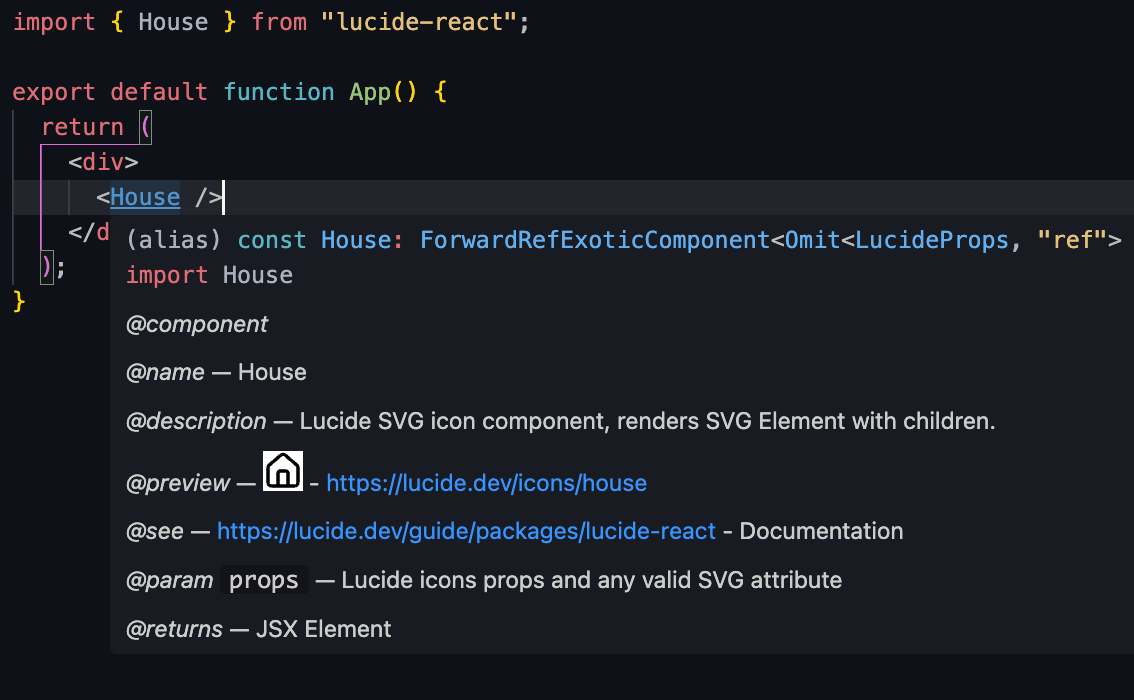
每个图标都提供了 JS 文档。在 VS Code 中,你可以将鼠标悬停在图标组件上以查看 JS 文档。
🌐 Each icon is provided with JS docs. In VS Code, you can hover over the icon component to see the JSdocs.
还显示了图标的一些预览。
🌐 Also a little preview of the icon is shown.
第三方插件
🌐 Third party plugins
有几个用于 VS Code 的第三方插件可以提供用于处理 Lucide 图标的额外功能。
🌐 There are several third party plugins available for VS Code that provide additional features for working with Lucide icons.
请查看 VSCode 扩展市场 了解可用的扩展。
🌐 See the VSCode Marketplace for available extensions.